TRA and MOV
In-depth review
Base descriptions:
TRAWWWW:XXXX:YYYY:ZZZZ
MOVWWWW:XXXX
TRA is one of the most important commands, next to ANP
Oh boy, look at all those arguments...
Let's break them up then shall we?(It's honestly not as hard as it looks)
Travel to map #W
Run event #X
Bring the player to the X coordinate #Y
And Y coordinate #Z
Here is an example:
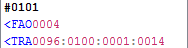
Remember, all maps have an assigned number:
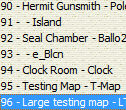
So this command would bring me to my Large testing map.
And run event #0100 for that map:

When using the TRA command, the event it runs, usually looks something like this.
With the fade in, show of map name, and a music change.
Since this is a non-conditional jump command(it will ALWAYS jump). any commands put after it will be ignored.
Yes, when using the TRA command, you HAVE to make it run another event.
The last 2 arguments just determine the X and Y coordinates, the player is brought to.
I know... the base description makes it look confusing.
It's the same case for MOV.
If you don't know how to find X and Y coordinates, I go over that
MOV is used to move the player to a differnt location on the map
The main difference between this command and TRA, is that MOV only allows you to move the player within the same map.
TRA can move the player between different maps, AND move the player within the same map, like MOV.
So why would you want to use MOV over TRA?
Well, TRA reloads the map, however MOV does not.
MOV also doesn't run an event unlike TRA.
Previous Lesson: SLP and PS+
Next Lesson: CRE, SIL, and CIL