SNP, CNP, DNP, DNA, and MNP
In-depth review
Base descriptions:
SNPWWWW:XXXX:YYYY:ZZZZ
CNPWWWW:XXXX:YYYY
DNPWWWW
DNAWWWW
MNPWWWW:XXXX:YYYY:ZZZZ
Don't be intimidated by the amount of arguments, in the SNP command
It's honestly not as bad as it looks.
This command will make entity number W, spawn in the map(refer to the entity list, for its number).
The next two arguments will determine its X and Y coordinates(where it spawns).
How would you find the X and Y coordinates on a map?
It's actually pretty simple, whenever you have your mouse on the map,
Booster's Lab will tell you the X and Y coordinates, your mouse is currently pointed to.
It is shown at the top of the window:

In this example, it is telling me that my mouse is currently pointed 8,4
(The first number is the X Coordinate, the second number is the Y)
Now with this information, you can tell the game EXACTLY where you want your NPC to spawn.
The last argument is just to determine its starting direction.
Remember:
0000 -> Left
0002 -> Right
Also, remember that some NPC's don't really have an "alternate direction", 0000 is the default direction.
CNP will change existing NPC's into different NPC's
Here's an example:
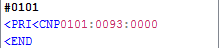
This will make, ANY entities
DNP will delete any and all NPC's with event number W
The NPC will reappear once the map is reloaded if you don't have the "No appear if flagID is set" entity flag set.
DNA will delete any and all NPC's with NPC #W
Example:
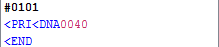
This command would delete all "Santa" entities on the map.
Will also reappear once the map is reloaded if you don't have the "No appear if flagID is set" entity flag set.
MNP will move an already existing NPC to a different location on the map
This is any entity
(Read section above to find X and Y coordinates)
Previous Lesson: CAT, SAT, TUR, MYB, MYD, MM0, ECJ, and NCJ
Next Lesson: CMP and SMP