Making Events (part 2)
Beginners
Alright let's actually teach you how make your own event, the first thing you need to do is specify the event number.
Make sure, that the new event number is in its own line.
#0100
(commands)
#0101
(commands)
#0102
(commands)
Now, when writing the event number, it must:
Start with #
Must be 4 digits long.
Even if your event number is less than 4 digits, you should still make it 4 digits long.
#150 -> #0150
#93 -> #0093
Why does it need to be that way? Well, it's just how the game reads it.
Making your event numbers less than 4 digits can make your game act weird or not run the event at all.
I would also advise not making your event numbers below 100.
Why? Because there are a few global events and setting an event number that is lower than 100
may overide one of them and mess alot of things up, and possibly even make your game crash.
You really shouldn't need more then 9899 different events on one map though...
Ah, yes let me explain...
When you write events in the normal script, those events are considered "local"
Only the map that you wrote them in is affected.
MEANING, if you were there were 2 different maps with an event #0100
They would only run the event #0100 in their respective scripts.
If you would want to make a global event(an event that is shared across all maps)
then you would need to write the event in the something like the Head.tsc file.
Here's some examples of global events:
Event # 16 is used by Save disks to save your game
Event # 17 is used by Health stations to refill your health and ammo
Something to note, whenever you place down a "Save disk" or "Health station" entity, they are not automatically
given these events, so if you try to interact with them without setting these numbers, they will do nothing.
These event numbers are not limited to the Save disk or Health station.
Any NPC can be given these event numbers and they'll do the exact same thing.
One last thing, when you are writing your events, it should be numbered in order.
Remember to put all the events in the right order, putting an event with a higher event number above events with a lower event number will confuse the game, sometimes causing that event to run when the events below it are called.
Example:
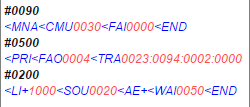
In the example, the events do the following:
• Event #0090 is a normal entry event.
• Event #0200 is for a npc that heals(and refills ammo) the player when they touch the npc and makes a sound to confirm this, and then waits for a second to make sure it doesn't keep looping 50 times a second till the event ends.
• Event #0500 is a normal exit through door event that brings the player to map 23.
Now, when event #0200 is called for in normal cases, it would heal the player and everything.
However, since event #0500 is above it and has a higher event number, that event gets called first, making the player go to map 23, and worst of all is that the player doesn't get healed. You don't want that to happen when you touch a npc that is supposed to heal you.
This is why you want the events in the correct order.
Alright, that's all for event numbers. Let's talk about commands next.
So what are commands?
(Alright Kenzo, how are you going to explain it?)
They... make stuff happen in the game...
(Real f*cking smooth Kenzo...)
Each command has a different effect on the game.
Let's go over the commands in the simple message event as an example.
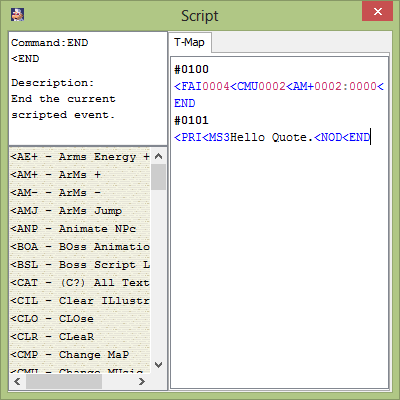
PRI
MS3
NOD
END
Now, why would we need all of these commands just to make a simple message in-game?
PRI
It'd be pretty weird if the player could just jump around the whole room while the NPC was talking to them.
MS3
NOD
*When the game is reading the script, and see's the MS3 command, it knows to display a text box at the top of the screen
and display a message.
However, once the game got to the end of the message, it would immediately move on to the next command.
In this case, that next command would be the END command.
The END command would then close out the message box, and end the current scripted event.
So what would happen, is that the message box would type in "Hello Quote." but then as soon as it reached the end of the
message, the text box would just close out. Giving the player very little time to read the message.
But if you put this command in, the game won't continue to the next command until the player has pressed the jump
button.
Allowing the player to be able to read the message box, and move on once they're done reading it.
END
And in most cases that would be something that you don't want to happen.
*If you don't have any scripted events below, then the game would
go back up to the top of the script, and start reading from there.
WOW, that really got off topic didn't it?
When writing a command they must always start with this symbol:

*Couldn't type it in because of the html format.
Followed by 3 characters.
The less than symbol(picture above) defines the start of a new command.
And the 3 characters after it define WHICH command it is.
Some commands aren't as simple as that though, sometimes they may need arguments.
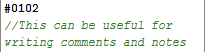
Here's something good to know, if you type in // in the script, anything put after that will be automatically ignored.
Previous Lesson: Making Events
Next Lesson: Arguments