Making Events
Beginners
Well... this is pretty boring... all Santa does, is blink at you.
So how about we have him say hello to Quote whenever we interact with him.
The first thing we need to do, is make a new event.
What's are events?
Events... are basically what makes stuff happen in the game.
How do I make events?
Through the script.
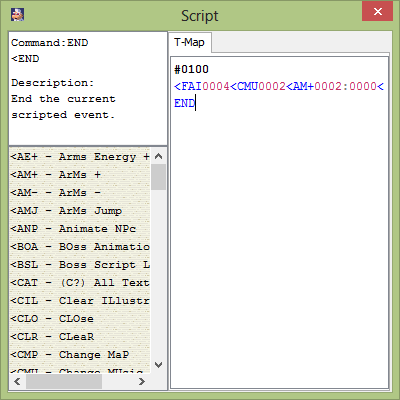
Remember that stuff I had you write in the script? Well what you wrote in there was actually an event.
There are 3 different parts to a basic event.
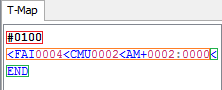
This is the event number. Setting your Npc's event number to this will make them run the event if you make them
"Interactable" and interact with them in-game. It also does other stuff, but i'll explain more on that in a later lesson.
These are TSC commands, each command does certain things to the game, from stuff like changing
the music currently playing, to bringing the player to a different map.
This is also a TSC command, however this is a very, very, VERY important command.
This command ends the current event running in the script.
Alright, so the event in the picture above is for event number 100.
So let's make a new event, and give it an event number of 101.
And let's put in the commands necessary for a simple message.
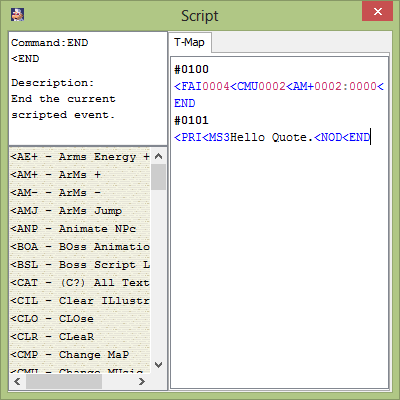
Now, there's one last thing we need to do, make Santa run this event when the player interacts with him.
First, make sure that Santa is selected:
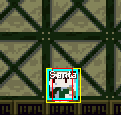
Now we need to go into the little blue box above the entity list and change the Event # to 101:
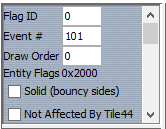
And scroll down to the bottom, and check off "Interactable"
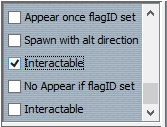
*Ignore the second "Interactable" at the bottom, i'll talk about it in a later lesson.
Now, we should have everything set up for a simple little message.
Now make sure you save your map again, and lets run the game once more.
Let's see what Santa has to say to us now:
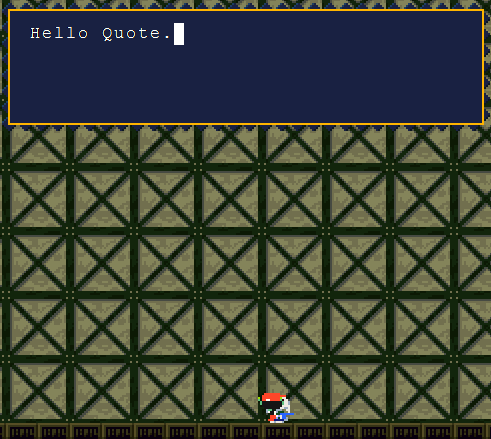
Congratulations! Assuming you did everything right, we've just made an Npc display a simple message whenever you
interact with them.
Now you may be asking "How do I make my own events?" well, we'll go over that in the next lesson.
Something that I you should know before we end off, there are keyboard shortcuts that allow you to select multiple entities
Hold "ctrl" and select your entities, to select multiple:
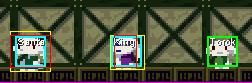
Hold "shift" and select an entity, to select all entities of that type on the map:
Previous Lesson: Creating a map (part 2)
Next Lesson: Making Events (part 2)