Arguments
Beginners
Sometimes commands need more information to properly funtion, this is where arguments come in.
So what are these "argumets"?
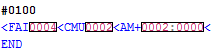
They're 4-digit numbers that come after the command.
*Not all commands use arguments
A good example of a command that uses arguments would be the CMU command.
CMUXXXX
Now, we know that this command tells the game to change the music... but, without the arguments that's all the game
would know.
It's like telling someone "Hey! Change the music!"
Ok... change it to what?
See what I mean?
Now, with arguments, we can tell the game exactly what song we want to play.
In the case above, we are having the game change the current song to "safety"
*Something you should know: arguments must always be 4-digits long regardless of what the number is
Simular to event numbers.
Alright? so how do I figure out what number goes to what song?
It's actually pretty easy, you can just use the TSC argument decoder:
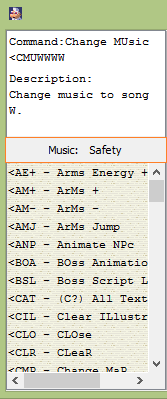
The argument decoder(in orange) will tell you more information about the argument number you are using
for a each command that uses arguments.
You may have noticed that in the script, there was a command that actually used 2 arguments:

Alot of the more advanced commands will need more arguments to work the way you want it to.
It really shouldn't be that hard to figure out since again, we have the argument decoder to help us.

Alright, let me briefly explain this command.
AM+XXXX:YYYY
So the command in the above script would give the player the Polar Star, with infinite ammo.
*Putting in the number 0000 for Y will make the gun have infinite ammo
Previous Lesson: Making Events (part 2)
Next Lesson: Order matters