Mychar
Editing assets
This section will be not be focused on Booster's Lab.
Hey! do want to use your own main character for your mod, instead of that Quote loser?
Well, you can easily change how the player character looks. Through the Mychar picture!
You can find it in the data folder of cave story.
Just right-click it, and choose "Edit"
Alright, let's take a look at it:
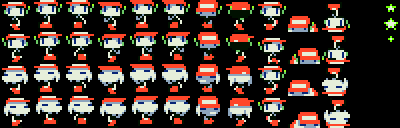
These are the spites that the game uses for the main character.
Alright, i'm going to tell you what the individual sprites do:
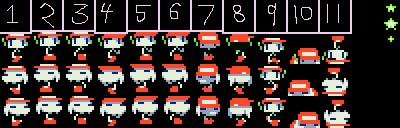
1.
2.
3.
4.
5.
6.
7.
8.
9.
10.
11.
*Those things on the right side, are the Whimsical star sprites
I'll explain how the walking sprites work:
It starts out with sprite #1
Then goes to sprite #2
Then goes back to sprite #1
Then goes to sprite #3
Then goes back to sprite #1
Then goes to sprite #2
Then goes back to sprite #1
Then goes to sprite #3
You see the pattern, right?
This is the same case for the sprites, with the player looking up.
All of the sprites I numbered, are for the character facing left.
And the sprites right below it do the same thing, except, those are for the character facing right.
Now, if you've played through Cave Story before, you should know what those sprites in the bottom-half are for.
(It's used for the Mimiga mask)
The game will change the player sprites to these ones whenever you equip the Mimiga mask.
You do not need the Mimiga mask "item" you can just do EQ+0064(the equip number for the Mimiga mask).
And if you would want to go back to the first set of sprites, then you would just do EQ-0064
Now, something you could do, is make the first and second set of sprites, 2 completely different characters.
And use the Mimiga mask to switch between them, it's sorta like having 2 main characters.
Something that you should know real quick
Cave Story uses the color white, as its transparent color.
Which is why the backrounds, of spritesheets are white.
But i've seen Cave Story use white before...
What you are actually seeing, is a color very close to white.
(Seriously, look very closely at Quote's shirt and hair)
So if you want to use the color white, just increase the hue a little bit, or something like that.
Previous Section: ESC, FRE, and NUM
Next Lesson: Face