IT+, IT-, ITJ, and GIT
In-depth review
Base descriptions:
IT+WWWW
IT-WWWW
ITJWWWW:XXXX
GITWWWW
The IT+ command is used to give the player one of the various items in the game.
You can use the argument decoder to see what item you would be giving.
I'm assuming that you already know what items do what, but if you don't you can always give it to yourself
and look at its description.
IT- is used to take away a certain item from the player.
If you try to take away an item that the player doesn't have, the command will do nothing...
GIT will show an item or a weapon icon on the screen.
But will only work if used with a MSG command.
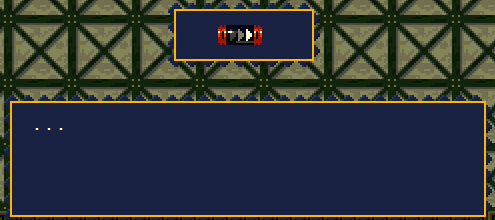
The argument decoder seems to be a little bit broken for this command, so i'll go over it here.
To show a weapon icon, you need to put in the weapon number.
The weapon number is the same number as its number for the AM+ command
(0002 -> Polar Star, 0003 -> Machine Gun)
The argument decoder may show you an item, but if you actually test it out in-game, you'll see that it is wrong.
If you start your argument with a 1, then the game will display an item.
(1002 -> Map System, 1020 -> Turbo Charge)
I noticed that the argument decoder will show the item when you type it in like this:
GIT0002
That would show you a weapon in-game, if you want the item to appear, then add a 1 at the beginning:
GIT1002
*Not quite sure if this is some glitch, but hopefully Noxid will fix it in the next update
The ITJ command is a little more complicated, it is used to jump to a different event
if the player has a certain item.
Here is an example of the command in use:
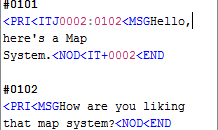
Now, let's say that we have an NPC on the map that runs event #0101 when you interact with them.
The first thing that the game does is freeze all game action, and then checks to see if the player has item number 0002
If the player has item number 0002, then jump strait to event #0102
However if the player does not have item, then do not jump, and continue the rest of the script.
With the way these events were set up, the first time the player interacts with the NPC,
the game checks if the player has the item, the player does not currently have the item,
but is given it later in the event.
Now that the player has the item needed for the ITJ, if the player were to interact with the NPC again,
The ITJ command would make the game jump to event #0102
When the game does a jump, it completely ignores any commands and/or other events inbetween it.
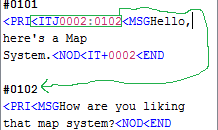
The jump here would ignore the MSG, NOD, IT+, and END command in event #0101
and go strait to event #0102 and start running it.
This jump will not only prevent the player, from getting item again. But also give the NPC new dialog.
And this will happen every time the player interacts with the NPC from now on until the player loses the item.
*There are many different kinds of commands that have the game jump to a different
event when certain conditions are met.
Previous Lesson: FAC, NOD, CLR, and CLO
Next Lesson: AM+, AM-, TAM, AE+, AMJ, and ZAM