ANP, HMC, SMC, FON, FOB, and FOM
In-depth review
Base descriptions:
ANPWWWW:XXXX:YYYY
HMC
SMC
FONWWWW:XXXX
FOBWWWW:XXXX
FOMWWWW
ANP is one of the most important commands to know when it comes to modding
This command is used to change the behavior of your NPC's to do things like walk, jump, and other actions.
Alright, let's break down the arguments:
Give all entities W(it's actually give all NPC's with event #W)
Scriptstate X(this argument determines which animation, the NPC will do)
With direction Y(this is just the direction faced)
Alright, at this point, you should know how everything works except for the scriptstate.
The scriptstate determines which animation the NPC will do.
How about we use the Quote NPC as an example:

(The Quote NPC is to the right, the Quote with the machine gun, is the player)
Oh, I guess I should explain why there is a NPC for the player.
This NPC is used, when you want to animate the player character in cutscenes.
You see, you can't actually "animate" the player directly, to do something like walk, or look up.
So this NPC's job is to do that for the player.
Here's an example of the command in use:

So if I gave our Quote entity here, an event number of 104, then this command would make it walk off to the right:

This is because scriptstate 50 is the NPC's walking animation.
How did I know that? I used the ANP text document(it's in the "reference sheets" folder).
You'll see that the Quote entity has many different scriptstates or "animations"
however, other characters such as Jack, do not have as many.
Now if you look at Quote's and Jack's scriptstates you may have noticed something:
Quote's scriptstate for walking is 50
but Jack's scriptstate for walking is 8
Now why do they have different numbers for the same animation?
That is because an NPC's, scriptstates
No entity shares the same scriptstates as another(the standing scriptstate is technically different for all NPC's)
So for a Jack NPC, this is what the walking command would look like:


Alright, let me quickly show you how you could make an NPC "walk" from one spot to another:
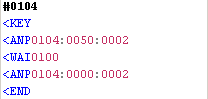
In this example, the ANP command would make the Quote entity start its "walking scriptstate".
Then the WAI command would make the game wait about 2 seconds before it moved on to the next command,
which is another ANP command, putting the Quote entity into the "standing scriptstate".
It's important that you put in another ANP command to make the NPC go into the "standing scriptstate"
because if you didn't then the NPC would stay in its "walking scriptstate" forever.
Likewise, the WAI command is important too.
Without this command, the game would run the first ANP command, but then go right to the second one.
The NPC would be put into the "walking scriptstate", but then immediately be put into the "standing scriptstate".
The WAI command, will make it so that the game will run the first ANP command, then wait a certain amount of time
before it ran the second ANP command.
The WAI command will also determine "how far the NPC walks" since it tells the game, when it wants it to move on
to the next command.
Now when we're talking about enemy NPC's. that's an entirely different story.
Enemies DO have scriptstates, these animations are usually attack patterns
Enemies are autonomous: they will "animate" themselfs automatically.
However, you can still "animate" them if you wish.
I'd also like to point out that the ANP list does not have ALL NPC scriptstates,
there are alot of NPC scriptstates within the game that are not mentioned, so please keep that in mind.
HMC is used to make the player invisible
Let me tell you something about Cave Story
In every single cutscene, the player is ALWAYS there.
Like in the very first cutscene with Kazuma, the player is here:
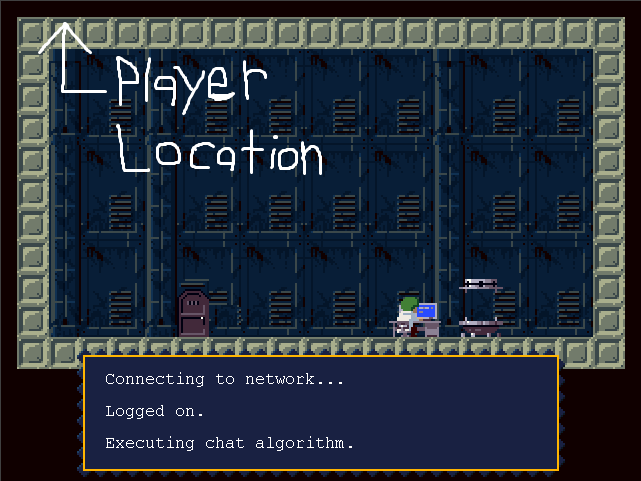
The player is just hidden with the use of the HMC command.
You can never show a map, without the player physically being there.
Remember to use the SMC command to make the player visable again
Otherwise the player will just stay invisible forever...
The FON command will have the camera center around an entity, with event #W
X will determine how many ticks it takes to the camera to focus on said entity.
If you have 2 or more entities with the specified event number, then the camera will focus on the entity
with the lowest draw order number.
FOB is used to have the camra focus on a boss
However you can still use FON to focus on a boss.
FOM will have the camera focus on the player
Remember to use this command after your done focusing on your NPC, otherwise the camera will STAY focused on the NPC.
*Note that if your map is too small for the camera to scroll, none of these commands will work.
*Also, if you use 0000 for your argument, the game will crash(divide by 0 error).
Here's some of the default arguments, for the focus commands, used in normal Cave Story:
0032 -> slow center
0016 -> medium-speed center
0008 -> fast center
0004 -> very fast center
Previous Lesson: CMP and SMP
Next Lesson: BSL and BOA